Film Prices, Film Scans, and Should You Shake It?
A Monthly Newsletter for GOLD Members
5 min read by Dmitri.Published on .


The latest analog.mom Film Price Report was quoted by PetaPixel, Kosmo Foto, and Digital Camera World, but GOLD members get deeper insights into the growing global film price divide. I’ll summarize what’s important in today’s newsletter.
I have also released film Q version 1 this month, which features a new automatic colour correction step that should take your film scans closer to their final state.
Lastly, I burned a couple packs of instant film to find out what actually happens if you were to “shake it like a Polaroid picture.” You may feel as surprised as I am to learn that no one has ever staged an experiment to show the effects of shaking — not even Polaroid.
In this newsletter: Automatic colour correction for film scans with film Q. The growing global film price divide. Should you shake it, “like a Polaroid picture?”” Support this blog & get premium features with GOLD memberships!
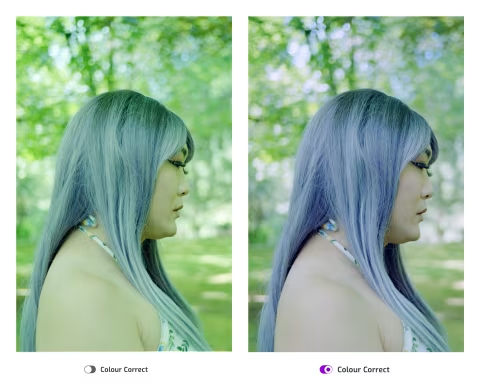
Automatic colour correction for film scans with film Q.
I designed film Q to be an app for just one purpose: invert film negatives. It works using an open standard (so you know exactly what it does to your film), there’s nothing to install, and it’s just one button to invert everything.
This flips the traditional scanning process in which each photo — good or bad — requires various adjustments in a proprietary interface. Instead, film Q creates something akin to a contact sheet, from which you can pick your favourite images and take them to the next level in your favourite image editor.
This process is meant to provide room to curate and edit freely, while demystifying and streamlining the inversion.
There are no sliders or dials to make the inversion process as smooth as possible — which was also the goal of the automatic colour correction step added to film Q v1.0.0. It’s just an on/off switch, currently on by default — but you can easily disable it in the Settings menu.
As usual, the app will leave you in the driver’s seat. The colour correction step is very gentle; it’s designed to preserve all image data while giving you full control over the colours.
The colour correction works by calculating the mean of the colour distribution in an image and nudging the values towards grey in the CIE Lab colour space, making it easy to isolate colour drifts from brightness.
However, not all photos can be corrected using just the Gray-World Assumption-based algorithm. Highly saturated objects can throw the system out of balance, which is why a part of the implementation in film Q excludes them from the calculations and uses several other techniques to ensure that the correction makes your images better.
As usual, I’ve tested this feature on a large list of personal and community sample scans.
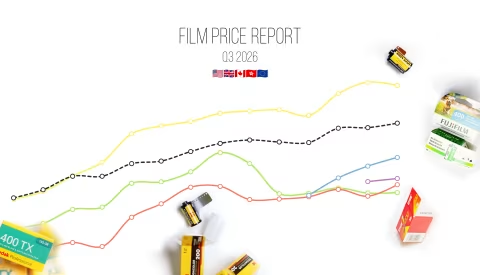
The growing global film price divide.
While researching film prices for the semi-annual report, in which I compared historical averages for over 30 film stocks since 2018, I’ve noticed a troubling trend forming: the cost of shooting film differs significantly depending on where you live. And this year in particular, the difference has grown.